
Have you ever searched for shoes online, and then seen shoe ads everywhere? That's not magic. That's your data, being tracked.
Your online privacy is not safe by default. Companies collect it. Hackers try to steal it. Even apps you trust may be watching more than you think.
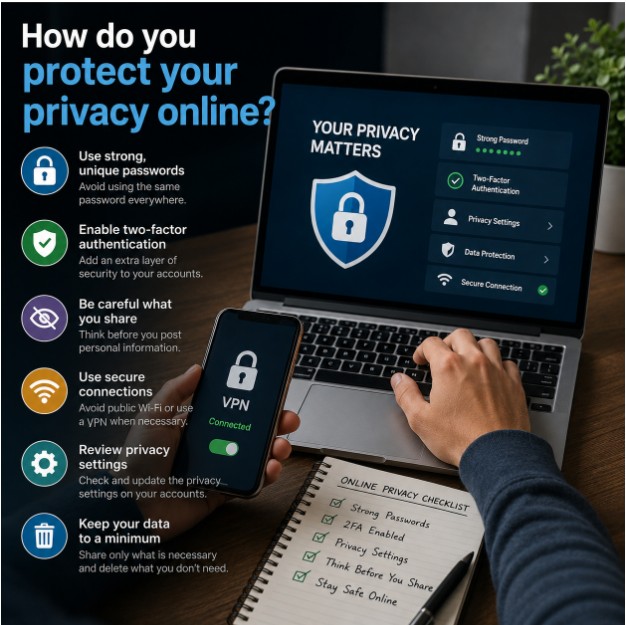
So, how do you protect your privacy online? That's exactly what we'll answer in this guide. No tech jargon. No boring lectures. Just simple, real steps that work.
Let's understand this step by step.
Think of your personal data like your house keys. Would you hand your house keys to a stranger? No, right?
But every day, we share personal data without thinking twice. Our location. Our photos. Our bank details. Our private chats.
Here's the truth: your data is valuable. Companies sell it. Scammers misuse it. And once it's leaked, you can't take it back.
Protecting your privacy online is not just for "tech people." It's for everyone. Students, parents, business owners, even school kids.
Before we fix the problem, let's understand it.
Here are the most common ways people lose their privacy online:
Sounds familiar? Don't worry. Most people make these mistakes. The good news? They're all fixable.
Let's go through the most effective, easy-to-follow tips. You don't need to be an expert. You just need to follow these steps.
Your password is like the lock on your front door. A weak lock invites trouble.
A strong password should:
Real-life tip: Use a passphrase like "Coffee@Sunrise92!" instead of simple words. It's easy to remember, but hard to crack.
Two-factor authentication adds a second layer of security. Even if someone steals your password, they still can't log in.
It usually works like this:
This one step blocks most hacking attempts. Most banks, emails, and social apps offer this feature for free. Turn it on today.
Social media feels personal, but it's public. Anyone can screenshot, share, or misuse your posts.
Ask yourself before posting:
If the answer feels risky, don't post it. Simple as that.
Free Wi-Fi at cafes and airports feels convenient. But it's also risky.
Hackers can use public Wi-Fi to steal your data, especially banking details. It's like having a private conversation in a crowded room. Anyone nearby could be listening.
If you must use public Wi-Fi:
A VPN (Virtual Private Network) hides your online activity. Think of it as an invisible tunnel between you and the internet.
With a VPN:
A good VPN is especially useful when using public Wi-Fi or accessing sensitive information.
Does a flashlight app really need access to your contacts? Probably not.
Many apps ask for permissions they don't actually need. This is a common privacy risk.
Go to your phone settings and check:
Turn off permissions that don't make sense for that app.
Updates are not just about new features. They also fix security holes.
Old, outdated software is easier to hack. It's like leaving a broken lock on your door and hoping no one notices.
Simple habit: Turn on automatic updates for your phone, apps, and computer. It takes zero effort after that.
Scammers love sending fake emails and messages. This trick is called phishing.
These messages often say things like:
Sound too good, too urgent, or too scary? Pause. Don't click. Verify directly with the official website or app instead.
Not all messaging apps protect your privacy equally.
Look for apps that offer end-to-end encryption. This means only you and the receiver can read the message. Not even the app company can see it.
This is especially important for sharing sensitive personal or business information.
Most apps and websites have privacy settings hidden in menus. Most people never check them.
Take 10 minutes today to review privacy settings on:
Small effort, big protection.
Let's clear up some confusion.
Myth 1: "I have nothing to hide, so privacy doesn't matter." Privacy isn't about hiding wrongdoing. It's about control. You decide who sees your information, not strangers.
Myth 2: "Only big companies get hacked." Individuals get targeted every day. Scammers often prefer easy targets, not just big companies.
Myth 3: "Antivirus software is enough." Antivirus helps, but it's not a complete solution. Privacy protection needs multiple layers, like the steps we covered above.
Want a quick reminder? Here's a simple checklist you can follow daily or weekly:
So, how do you protect your privacy online? It's not about one big action. It's about small, consistent habits.
Think of online privacy like brushing your teeth. You don't do it once and forget about it. You do it daily, and it protects you long-term.
Start with one step today. Maybe it's turning on two-factor authentication. Maybe it's checking your app permissions. Small steps add up to strong protection.
Your data is valuable. Treat it that way.
Stay safe, stay smart, and take control of your online privacy, starting today.